
Weather the Trip
Witt SoftwareWeather
3.537.00 Reviews
- Version
- 2.50-googleplay
- Installs
- 10.00K
- Age Rating
- Everyone
Screenshots
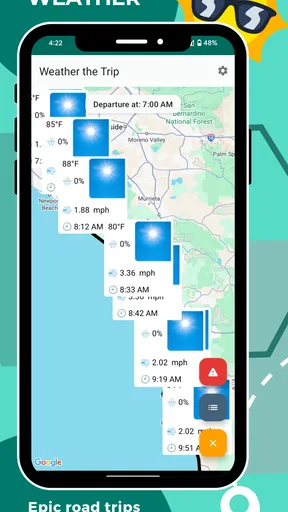
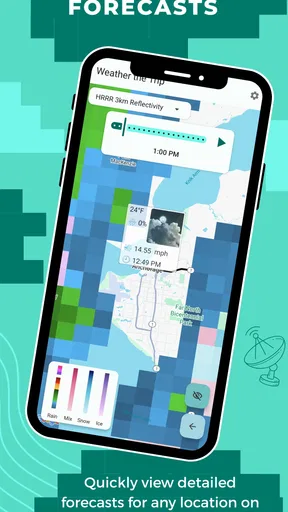
Our Review of Weather the Trip
 Analysis by Appyee
Planning a long drive is different from checking whether it will rain in your neighborhood. A local weather app can tell me what is happening above my house, but a road trip crosses several places, changing elevations, and sometimes entire climate zones. Weather the Trip is built around that specific problem: helping me think about weather along a journey instead of treating the destination as the whole story.
I reviewed it as a free weather app from Witt Software, and I found its idea immediately practical. The app is aimed at travelers who want a broader view before setting off, particularly when the route matters as much as the arrival point. It is available to an Everyone audience, which makes it approachable for families and casual travelers, while its Android requirement means people using older phones may need to check compatibility before planning around it.
The app has a modest footprint in the store, with over ten thousand installs and a 3.5 average from more than seventy ratings. That does not make it a runaway mainstream weather service, but it does give me a useful expectation: this is a focused tool worth testing for its road-trip workflow, not a replacement for every weather feature found in larger apps.
How the trip-focused idea works in everyday planning
My first useful takeaway is that the app changes the question I ask. Instead of opening a forecast and wondering whether conditions will be acceptable at one location, I can approach a journey as a sequence of weather decisions. Will the first part of the drive be comfortable? Could conditions change before reaching the next stop? Is the forecast at the destination irrelevant if the route becomes difficult several hours earlier?
That perspective is especially helpful for journeys where the departure time is flexible. A traveler can compare the expected conditions along the route and decide whether leaving earlier, later, or on another day makes more sense. Even without treating the forecast as a guarantee, seeing the trip as a connected weather problem is more useful than repeatedly checking separate towns with no overall plan.
A realistic example would be a family driving to a coastal campsite. The destination forecast might look pleasant, yet the route could pass through an inland area with very different conditions. I would use the app before leaving to identify where the trip deserves extra attention, then make a practical decision about clothing, breaks, and timing. The value is not that it removes uncertainty; the value is that it helps me notice uncertainty before I am already on the road.
It can also suit people who travel for outdoor activities. A cyclist, photographer, camper, or motorcyclist may care less about a single city forecast than about how conditions evolve across a route. For these users, a trip-oriented view can reduce the habit of collecting disconnected forecasts and make preparation more deliberate.
What makes it different from a typical weather app
Most familiar weather apps are designed around a current location, saved places, hourly conditions, radar, alerts, or a general daily outlook. Those tools are often better when I need immediate local detail. If I am already at a hotel and want to know whether rain will arrive in the next hour, a conventional weather service may be the faster choice.
Weather the Trip has a narrower purpose. Its strength is the route as a whole, not necessarily the depth of every standard weather feature. That distinction matters because a specialized workflow can be more useful than a larger feature list when the real question is, “What will the journey be like from start to finish?”
I would not install it expecting a complete replacement for a mature everyday weather platform. People who rely heavily on radar interpretation, severe-weather notifications, long-term local history, or extensive widget customization should compare it with their current service rather than assuming the trip view covers every need. The app makes more sense beside a regular weather app than as an automatic substitute for one.
The developer, Witt Software, presents the product as a dedicated travel-weather utility rather than a general lifestyle platform. That focused identity is reassuring in one sense: I know why I am opening it. At the same time, a focused app needs to make its route planning experience clear and dependable, because users will judge it on whether it helps them make a concrete travel decision.
Small workflow choices that improve the result
I would begin by checking the route before packing, not while standing beside the car. Weather information is most useful when it changes a decision early enough to act on it. Looking at the journey in advance gives me time to adjust departure plans, prepare different clothing, reconsider a stop, or decide that a second weather source deserves a closer look.
A second useful habit is to divide a long trip mentally into sections. Even when the app presents a broad journey view, I would not treat the route as one uniform condition. A morning departure, a midday crossing, and an evening arrival can create different practical needs. This is particularly important when a traveler is carrying children, camping equipment, or anything affected by wet or cold conditions.
My third tip is to use the app for planning, then recheck immediately before departure. Forecasts change, and a route-based view should support a decision rather than become a reason to stop thinking. If conditions look uncertain, I would compare the relevant locations with a trusted local source and pay attention to official warnings. That two-step workflow is more sensible than relying on any single forecast screen.
For a shorter drive, the specialized approach may feel unnecessary. If I am traveling across town, a standard weather notification is probably quicker. The longer and more varied the route, the more convincing the app’s central idea becomes.
Trust, controls, and moments where I would be careful
Weather apps naturally raise trust questions because they can influence real decisions. A forecast may affect whether someone drives, hikes, camps, or postpones a trip. I therefore look for more than a pleasant interface. I want to know what the app lets me control, what choices are visible, and whether I can use it without feeling pushed into an unclear setup.
Weather the Trip is free to download, but it includes optional in-app purchases ranging from $2.99 to $20.23 per item. That does not automatically make the app poor value, yet it is a detail I would keep in mind before committing to it as a regular travel tool. I would first establish whether the free experience answers my needs, then decide whether any optional purchase is worthwhile. A user should never assume that “free” means every possible capability is included.
The store identifies the current release as version 2.50-googleplay, and the app was released on November 14, 2021. Those details help place the product in context, but they do not replace hands-on checking of the current screens and choices. When I install it, I would pay attention to the first launch: whether the app clearly explains what it needs, whether optional prompts can be skipped, and whether purchase choices are understandable before I tap through them.
That is also where I separate verified controls from assumptions. I do not treat a clean weather screen as proof that an app collects little information, and I do not treat the absence of an obvious account step as proof that no account-related process exists. I prefer to inspect the app’s own permission prompts, privacy explanations, and settings directly. If a choice is not clearly presented, I would avoid guessing about it.
Data-sensitive moments during a trip
Location is the most sensitive moment for many travel apps. A route-weather tool may be more convenient when it can work with places connected to a journey, but convenience should not make me careless. I would look closely at whether location access is requested, whether I can enter places manually, and whether the app explains the difference between using my current position and selecting a route myself.
Manual entry can be valuable for privacy as well as control. If I am planning a trip from home, I may not want to grant live location access simply to check a forecast. If the app offers a way to choose places without sharing a live position, that would give me a more deliberate workflow. I would choose the least intrusive option that still provides the information I need.
I would also review notification controls before enabling them. Travel alerts can be useful, but not every user wants a weather app interrupting the day. A good setup should let me decide whether notifications are appropriate, especially when I am only researching a possible trip rather than actively traveling. If the controls are too broad or unclear, I would leave notifications off and check manually.
Another data-sensitive moment comes when using the app in public or while traveling with other people. I would avoid handing my unlocked phone to a child or passenger without first checking whether purchase prompts are protected by the device’s normal confirmation process. Since optional items are part of the app’s model, purchase awareness matters even in an otherwise simple weather workflow.
How much control the user really has
For me, user agency means being able to decide how the app is used, not merely being offered a forecast. I want to choose when to check it, which route details to provide, whether notifications are worth enabling, and whether optional paid elements fit my needs. The app is most comfortable when those choices are visible rather than hidden behind a rushed setup.
I would also keep expectations realistic about forecast authority. A route forecast is a planning aid, not a driving instruction. If official weather warnings advise against travel, I would follow those warnings rather than trying to optimize a trip inside the app. Similarly, conditions can change between the time I plan and the time I leave, so I would treat the app as one input in a broader safety decision.
This is where the app may not suit everyone. A traveler who wants a fully automated experience, rich local alerts, and a familiar ecosystem of maps and widgets may prefer a major weather platform. Someone who dislikes optional purchases on a free app may also find the model less appealing. And anyone using an older Android device should check the operating-system requirement before investing time in the setup.
On the other hand, people who routinely plan multi-stop journeys may appreciate the focused purpose. The app can encourage a better habit: checking the conditions between places instead of assuming that the destination forecast represents the entire drive. That is a meaningful advantage, particularly for travelers who have previously been surprised by changing conditions midway through a route.
Who should install it, and who should skip it
I would recommend trying it if your weather questions usually begin with a route. Road trippers, campers, families traveling between regions, and anyone arranging a day outdoors across several locations are the clearest audience. The free entry point makes experimentation easy, provided the device meets the Android requirement and the optional purchase structure is acceptable.
I would skip it if your needs are almost entirely local. For a daily commute, a home-screen forecast, or a quick look at rain near the office, a standard weather app is likely simpler. I would also skip it as a sole source for high-stakes travel decisions. A specialized route view is helpful, but it should not replace official warnings or a second check when conditions are serious.
People who are highly privacy-conscious should approach it thoughtfully rather than automatically rejecting it. The right question is not whether the app sounds travel-oriented; it is which permissions and choices appear during use. I would review those prompts, prefer manual location selection when available, and avoid enabling anything I cannot explain to myself.
Finally, users should decide whether the app’s focused design is worth adding another tool to their phone. If a current weather service already handles route planning in a way that feels clear, installing another app may add friction. If that service only shows one location at a time, this app’s travel-centered approach could fill a genuine gap.
My cautious verdict after using the concept in practice
Weather the Trip is appealing because it addresses a real weakness in ordinary weather checking: journeys are not single points on a map. I like the way its purpose encourages me to think about changing conditions along the road, and I can see clear value in using it before a long drive rather than waiting until the destination forecast becomes the only thing I notice.
My recommendation is measured. I would keep it as a planning companion for longer routes, especially when timing and intermediate conditions matter. I would not rely on it alone for severe weather decisions, and I would not replace a strong everyday weather app without first comparing the details I personally use most.
The trust question is equally practical. I would install it, inspect the first-run prompts, review location and notification choices, and understand the optional purchases before making it part of my routine. Those steps take little time and preserve control over how the app fits into a trip.
In the end, this is a specialized free weather app with a useful travel angle, a moderate reception reflected in its 3.5 average, and a clear audience rather than universal appeal. Its best use is as a route-planning lens, not as an all-purpose weather authority. If your journeys regularly cross several places, it is worth testing. If you only need quick local forecasts, the usual alternative will probably remain the more convenient choice.
Verdict
Strengths of Weather the Trip
- Provides weather forecasts for planning trips and outdoor activities.
- Useful travel-focused information in a simple, accessible format.
- Can help compare conditions before choosing a destination.
- Convenient for checking weather while away from home.
- May reduce surprises by highlighting changing travel conditions.
Limitations of Weather the Trip
- Forecast accuracy can vary by destination and weather conditions.
- Some locations may have limited or incomplete weather data.
- Frequent forecast updates may require a stable internet connection.
- Weather details may not be as comprehensive as specialist apps.
- The app’s usefulness depends on the coverage available in your region.
Similar Picks in This Category
View All
Weather - By Xiaomi
Xiaomi Inc.4.1

Weather & Radar Forecast
WetterOnline4.8

Weather
OneLouder Apps4.6

AccuWeather: Weather Radar
AccuWeather3.6

The Weather Channel - Radar
The Weather Channel4.6

1Weather Forecasts & Radar
OneLouder Apps4.3
Frequently Asked Questions
What is Weather the Trip, and what does it do?
Weather the Trip is a travel-focused weather app designed to help you check conditions before and during a journey. Instead of showing only the current weather at your location, it can be used to review forecasts for destinations and planned travel routes. This makes it useful for preparing clothing, choosing suitable travel times, and anticipating rain, wind, temperature changes, or other conditions that could affect your plans.
Can Weather the Trip be used for planning a complete journey?
Yes, the app is intended to be helpful when organizing travel rather than checking a single city in isolation. You can use it to compare weather conditions at different points of a trip and get a better idea of how conditions may change along the way. Forecast accuracy and available route features can depend on the selected locations, travel dates, and the data provided by the app’s weather services.
Does Weather the Trip provide accurate and reliable forecasts?
Weather the Trip can provide useful forecast information, but no weather application can guarantee perfect accuracy. Forecasts are generally more dependable in the short term, while predictions several days ahead may change as new data becomes available. Before making important travel, outdoor, or safety decisions, it is sensible to refresh the forecast and compare severe-weather warnings with official local meteorological sources.
Does Weather the Trip require location access or an internet connection?
The app may request location permission so it can identify your current position and show relevant weather information without requiring you to enter a place manually. An internet connection is normally needed to download updated forecasts, map data, and travel-related weather details. If you are traveling abroad or entering areas with limited connectivity, check whether previously viewed information remains available and consider downloading essential details in advance.
Is Weather the Trip free to download, and are there advertisements or purchases?
Availability, advertising, and pricing can vary according to the Android or iOS version and the developer’s current release. Some functions may be available at no cost, while advanced tools, an ad-free experience, or additional weather and trip-planning features could require an in-app purchase or subscription. Review the store listing carefully before downloading, especially if you want to avoid recurring charges.
